Saqr
One assistant for the whole house
Saqr reads your family's school mail, bank texts and document dates, tells you what needs doing and when, and drafts the follow ups for a parent to confirm.
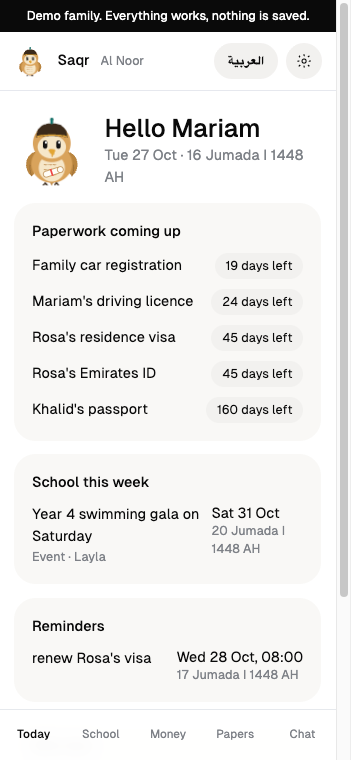
Where Saqr works
Message Saqr in the chat you already use, and see the whole picture in the web app.
What Saqr keeps track of
School
School mail and its PDF attachments become dated items for the right child.
Money
Bank texts in English and Arabic become one ledger, with goals paced against your month.
Papers
Visas, Emirates IDs, passports, licences and car registration, with countdowns and checklists.
Reminders
Sent once, held through the night and around iftar.
Drafts
Replies to school, reminders and calendar events wait for a parent to confirm.
Read only money
Saqr never pays, transfers or orders, and never asks for passwords or codes.
What Saqr knows
UAE know-how built in, each piece with its official source and the day it was last checked. Anything not checked for 90 days is shown as to confirm.
The school year
The Ministry of Education's unified calendar for 2026 to 2029: first and last days, mid term, winter and spring breaks. Sharjah private schools and April start curricula are flagged as different. Public holidays stay "around" until announced.
Renewal steps
Usual steps and papers for visas, Emirates IDs, passports, licences, car registration, health insurance and Ejari, with the official site (ICP, u.ae, RTA, DHA, Dubai Land Department) and the date each was checked.
Arabic and English
School notices, PDFs and bank texts in Arabic, English or both become the same items, and each parent gets reminders and digests in their own language.
How Saqr works
Saqr reads, sorts and drafts. A parent decides. That rule came before the first feature, not after it.
- 1
Something arrives
School mail forwarded to the family's own address, a bank text, a photo or PDF of a letter, a parent's message on Telegram, WhatsApp or the web, or the time a reminder or digest is due.
- 2
Code checks it first
Mail from a sender the family has not approved, or from a faked domain, waits for a parent. Children's names and card numbers are masked before a model sees the text, and instructions inside a message are read as data. A greeting, or a parent saying stop, is answered by code.
- 3
Saqr hands over, or the agent works
When a stop rule applies, Saqr stops and says who decides. Otherwise the model reads the message and chooses among fixed tools: dates and amounts come out with the message they came from, and anything that would change something becomes a draft.
- 4
A parent decides
Reminders, replies to school, promises, budgets and calendar events save only when a parent taps Confirm. A reply to school is sent by the parent, from their own email.
What Saqr does on its own
- Reads forwarded school mail, bank texts and statements into the family's agenda and ledger
- Reminds parents of deadlines, renewals and bills, and sends the evening school digest and the Sunday week ahead
- Tells both parents at once about urgent school mail: a child's safety or health, or a change to today's school day
- Answers a parent's questions from the family's own records
- Drafts reminders, replies, budgets and calendar events for a parent to confirm
What Saqr never does
- Pay, transfer or move money
- Send anything to a school or anyone outside the family
- Contact anyone on the family's behalf, or promise anything to a school
- Ask for passwords, full card numbers or one time codes
- Follow instructions written inside an email, a text or a photo
- State a fee, date or price that no message, paper or parent gave
- Send a reminder or save a change no parent confirmed
When Saqr stops
Saqr drafts nothing, says in one line why it stopped, and says who decides. What happens next is the parents' call.
- An amount or date it would give has no source in the family's mail, texts, papers or a parent's own words
- Who decides: The parent who asked
- A bank charge or text looks like fraud, a scam or a dispute
- Who decides: Both parents
- A question needs a legal, visa or residency judgement beyond the published renewal steps
- Who decides: The parent who asked, with ICP, GDRFA or the office concerned
- A complaint to or from the school
- Who decides: Both parents
- A parent says stop: drafts still waiting for Confirm are cancelled
- Who decides: The parent who asked
Each tool and what it may do
Saqr acts only through these tools. Each reads and writes named records in the family's own space, and every change in chat waits for a parent.
- Read school mail
- Reads: Forwarded mail from approved senders, PDFs and photos of letters
- Writes: School items with the email they came from; urgent mail to both parents at once
- Parent's Confirm: Not needed. A parent approves each new sender once
- Read bank texts
- Reads: Bank texts and card statements the family forwards
- Writes: Charges in Money with the text they came from, subscriptions, budget alerts
- Parent's Confirm: Not needed. Read only: Saqr never pays. Texts that look like scams are kept out and every parent is told
- Draft a reply to school
- Reads: One school item and the email it came from
- Writes: A reply draft, addressed only to the school's own domain. It refuses complaints
- Parent's Confirm: Needed. The parent can edit it, then sends it from their own email
- Track a promise
- Reads: The parent's own words and the school item it is about
- Writes: A promise, with a nudge at 18:00 the evening before and 08:00 on the day
- Parent's Confirm: Needed
- Set or stop a reminder
- Reads: Reminders, quiet hours, prayer times and school hours
- Writes: A reminder, once or repeating, or its stop
- Parent's Confirm: Needed
- Mark done
- Reads: A promise, form, fee or deadline
- Writes: The item closed and its nudges stopped
- Parent's Confirm: Needed, or the parent taps Done
- Renewal stages
- Reads: Paperwork expiries, the official steps and the date they were checked, renewal letters
- Writes: A message at each stage to every parent; a renewal letter adds or moves an expiry
- Parent's Confirm: Not needed: it writes only to the family. Adding a document in chat needs Confirm
- Digests
- Reads: The week's school items, Still owed, the school calendar and pocket money
- Writes: The evening school digest and the Sunday week ahead, to the parents
- Parent's Confirm: Not needed. A parent turns each on or off in Settings
Who Saqr acts for
Saqr acts only for the parents linked to the family, within fixed limits, and a parent can take that away at any time.
Only the linked parents
Saqr takes requests, Confirms, photos and PDFs only from a parent's own linked chat, and the web app signs in only with a link sent to that chat. Children and household staff cannot ask Saqr anything or confirm anything.
Its limits
Saqr never pays, transfers or moves money. It never sends or saves anything until a parent taps Confirm, and a reply to school is sent by the parent from their own email. It never contacts the school or anyone outside the family.
How a parent stops it
Saying stop in the chat cancels every draft still waiting for Confirm. In Settings, a parent removes another parent or staff member under Family members, which ends their linked chat and web sign in at once, turns each digest off, or deletes the family and all its data.
Who is responsible
The parents decide: nothing leaves or changes without one of them. Yalla DevRel LLC operates Saqr and answers for how it behaves, through Talk to the team in Settings or the contact page.
See Saqr with a real family's week
The demo family has a month of school mail, bank texts and renewals.